AVD Graphic Studio is a mini Photoshop, offering very similar capabilities at a fraction of the cost. It provides over 20 tools to work with images – cropping, resizing, rotating, bump mapping, histogram equalization, mirroring (horizontal and vertical), special effects filters and many more handy options for image manipulations.
AVD Graphic Studio offers both single and batch image processing options. AVD Graphic Studio can be used by any amateur, who just recently purchased digital camera, the software does offer quite a few sophisticated options for professional designers and digital artists.
For instance, AVD Graphic Studio acquires images from TWAIN scanners and can be used to regulate contrast, HSL, HSV/HSB and RGB settings. AVD Graphic Studio comes with four modules – MultiPage, Video, Animation and Batch Processing.
 Download AVD Graphic HERE
AVD Graphic Studio Features :
Download AVD Graphic HERE
AVD Graphic Studio Features :
1. Save/load specific file format parameters and save/load preview dialogs
2. Acquires images from TWAIN scanners
3. Image processing (Equalize, Contrast, RGB, HSV, HSL, FFT, convert to 24 bit, gray and B&W)
4. Effects (Negative, bump map, lens, wave, morph, user filters)
5. Crop functions and Copy to clipboard
6. Changes resolution on graphic files
7. Advanced print control (many options)
8. Rotating through any angle
9. Mirroring (horizontal and vertical)
10. Resizing (9 filters for quality resampling : Triangle, Hermite, Bell, BSpline, Lanczos3, Mitchell, Nearest, Linear, FastLinear)
11. Draw with a multitude of tools
12. Extents selection, resizing and moving regions
13. Image clearing - Remove Noise and Remove Isolated Pixels
14. Image Deskewing (to correct images that were skewed from fax transmission, scanning, etc).
15. Simple tool which helps to remove red eyes
16. Drop shadow (Gaussian Shadow)
17. Frame, Mask and Border Effects
18. Slicing tool
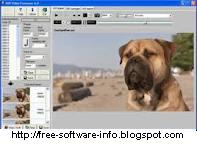
The first module, as it names suggests, is show all kinds of FAX images, multipage FAX and multipage TIFF images (rev.6.0, Packbits, LZW, CCITT G.3 and G.4) with RGB, CMYK, B/W, animated GIF and Multipage PCX (DCX). Also FAX (CCITT3), G3F and G3N (Zetafax) formats supported for loading.
The second Video module allows users to capture individual frames from video files in order to create animated GIF files. The third module creates animated GIF files from a set of static images (tif, tiff, fax, gif, jpg, jpeg, jpe, pcx, bmp, dib, rle, ico, cur, png, wmf, emf, tga, targa, vda, icb, vst, pix, pxm, ppm, pgm, pbm).
The fourth module, as it names suggests, is intended for processing multiple images in batches. The module supports all common image formats and offers conversion, resampling, resizing and resolution readjustment options, among others.
System Requirements :
1. CPU 500 MHz
2. 512 MB RAM


 Falco Viewer 1.2 Features :
 The simple user interface of Falco Viewer ensures full and easy access to its functions. The preferences that you apply will be reflected immediately and you don’t have to be a professional editor to get the result that you want. This fantastic program lets you view your images without waiting even a second. This is the main advantage it gives you, compared to other tools in its category.

